Payment Gateway Rotator gives WooCommerce stores tighter control over how gateway traffic is distributed at checkout.
Rotate payment gateways by percentage, keep customer routing sticky, apply gateway-specific discounts or fees, show one or multiple rotating gateways at once, and automatically pause a processor if failures start stacking up too high.
- Weighted gateway rotation with sticky customer behavior
- Per-gateway discounts, fees, daily caps, and checkout messaging
- Automatic fail-safe pause logic when a processor starts failing too often
Built for real WooCommerce traffic control
This is for stores that actually need smarter payment routing, not just another checkout gimmick.
Sticky customer routing
Customers stay tied to their assigned gateway path for a cleaner and more predictable repeat checkout experience.
Revenue-aware controls
Apply discounts, fees, daily caps, and gateway roles with more precision instead of treating every processor the same.
Protection built in
If one processor starts failing too much, the fail-safe can bench it before it keeps dragging down checkout results.
Control gateway exposure without turning checkout into a mess.
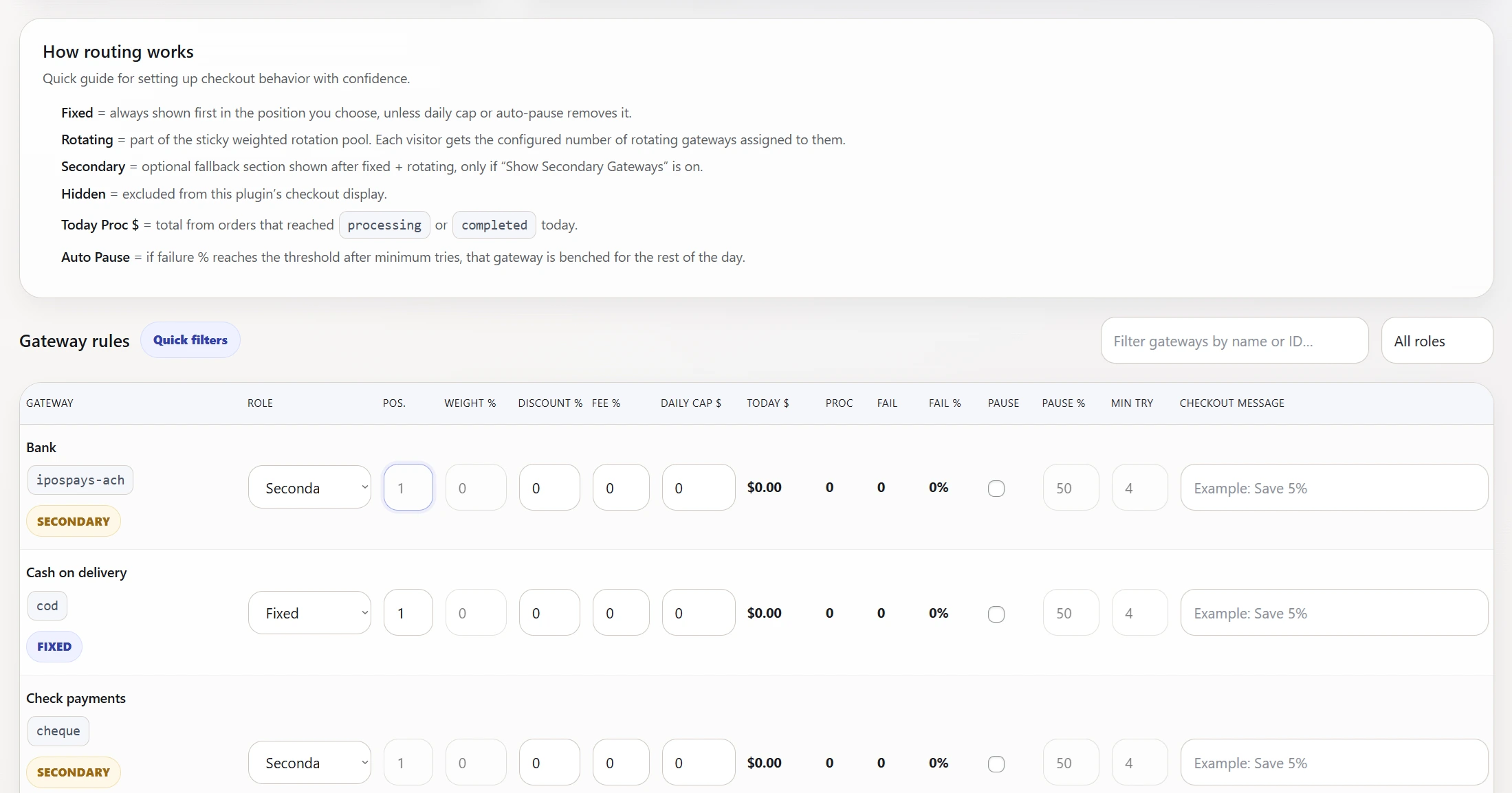
Payment Gateway Rotator lets you assign gateways as fixed, rotating, secondary, or hidden. Rotating gateways can be weighted by percentage, and you can choose whether to show one or multiple rotating methods at the same time.
It also supports optional secondary gateway visibility, so fallback methods can stay available without losing control over the main routing logic.
Because one processor should not always have to carry the whole store.
- Spread payment traffic across multiple gateways
- Keep checkout behavior more consistent with sticky assignment
- Encourage or discourage certain methods with discounts or fees
- Prevent weak processors from quietly hurting conversions
- Get more flexibility than default WooCommerce gateway display allows
Weighted rotation
Set percentage-based distribution across rotating gateways so traffic flows the way you want instead of randomly or all through one option.
Gateway roles
Assign gateways as fixed, rotating, secondary, or hidden depending on how each processor should appear and behave at checkout.
Sticky routing
Once a customer is assigned a rotating gateway, the plugin keeps that behavior sticky for a cleaner repeat checkout experience.
Discounts and fees
Apply gateway-specific discounts or fees so you can incentivize preferred processors or offset cost differences more intelligently.
Daily caps
Limit how much volume a processor should handle in a day so you can manage exposure across gateways more carefully.
Auto-pause fail-safe
If a gateway’s failed order rate crosses the threshold after the minimum number of attempts, the plugin can pause it automatically.
This plugin is a strong fit if your store needs more control than WooCommerce gives you by default.
- You want to rotate payment traffic across multiple processors
- You need sticky customer behavior instead of random gateway switching
- You want to attach discounts, fees, or messaging to specific gateways
- You need a fail-safe when one processor starts underperforming
It is not just a simple gateway shuffler.
This plugin combines routing control, sticky assignment, incentive logic, daily cap controls, and failure protection into one cleaner admin system.
That makes it useful for stores that actually depend on smarter payment distribution instead of just wanting another checkbox plugin.
From install to controlled routing in a few clear steps.
Install and activate
Install the plugin on your WooCommerce store and activate it on the intended domain.
Assign gateway roles
Choose which gateways are fixed, rotating, secondary, or hidden in the routing system.
Set routing rules
Apply percentages, visible rotating count, discounts, fees, daily caps, and optional checkout messages.
Let the fail-safe protect checkout
Enable auto-pause thresholds so a weak processor can be benched before it keeps costing you orders.
See the plugin in action here, then buy it through the plugins page with the rest of the lineup.
Routing checkout traffic properly can make a real difference when you are balancing multiple processors and trying to keep conversion flow cleaner.